
Coming soon to MacFree trialOpen-source engine
Drop it in the inbox.
Tria reads it, names it
and files it where it belongs.
Tria sorts your documents with AI, following your rules, written the way you’d explain them to a person. It proposes a name and a folder for each one, and you decide. It never deletes anything, and everything can be undone.
brew install startcat/tap/triaThe app isn’t on sale yet: write to us and we’ll let you know the day it’s out on the Mac App Store. The CLI is ready to install.
Your first 20 documents are free. After that, €9.99 once: with 200 Tria AI documents included, or unlimited with your own Anthropic or OpenAI key.
A Start.cat product
Downloads, scans, attachments…
How it works
Three steps. The last one is yours.
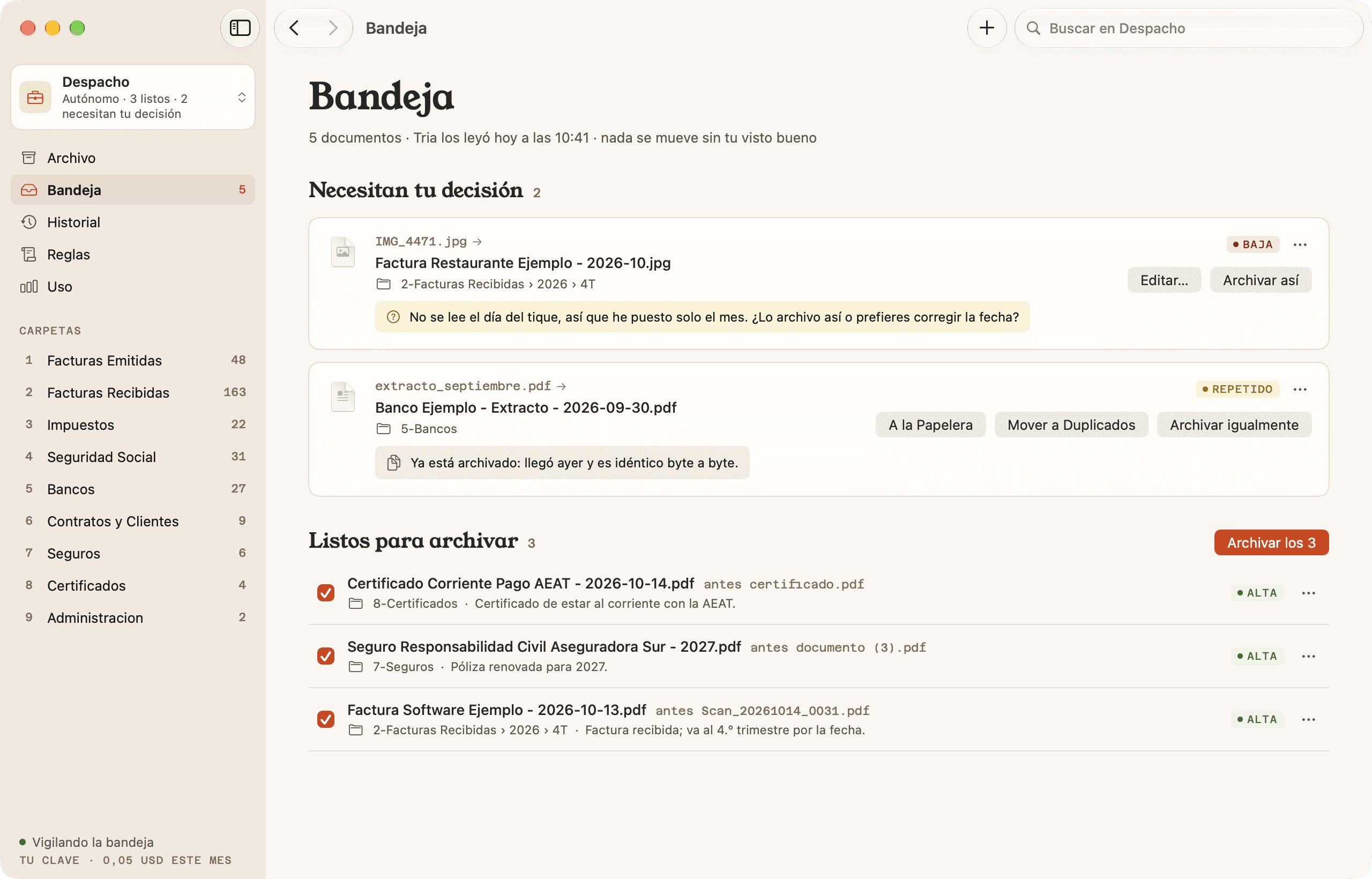
Drop your documents in the inbox.
Drag them onto Tria or save them to the inbox folder. A paper receipt? Scan it with your iPhone and it shows up there.
Tria reads them and proposes.
It pulls out the text on your Mac, scans included, and the AI reads it with your rules. You get a clear name and a folder for each one, with the reason.
You review and approve.
All at once, one by one, or change whatever you like first. Only then does anything move. Changed your mind? Undo.
Once you trust it, turn on automatic mode: Tria files only what it’s very sure about, and the rest waits for you in the inbox.
Features
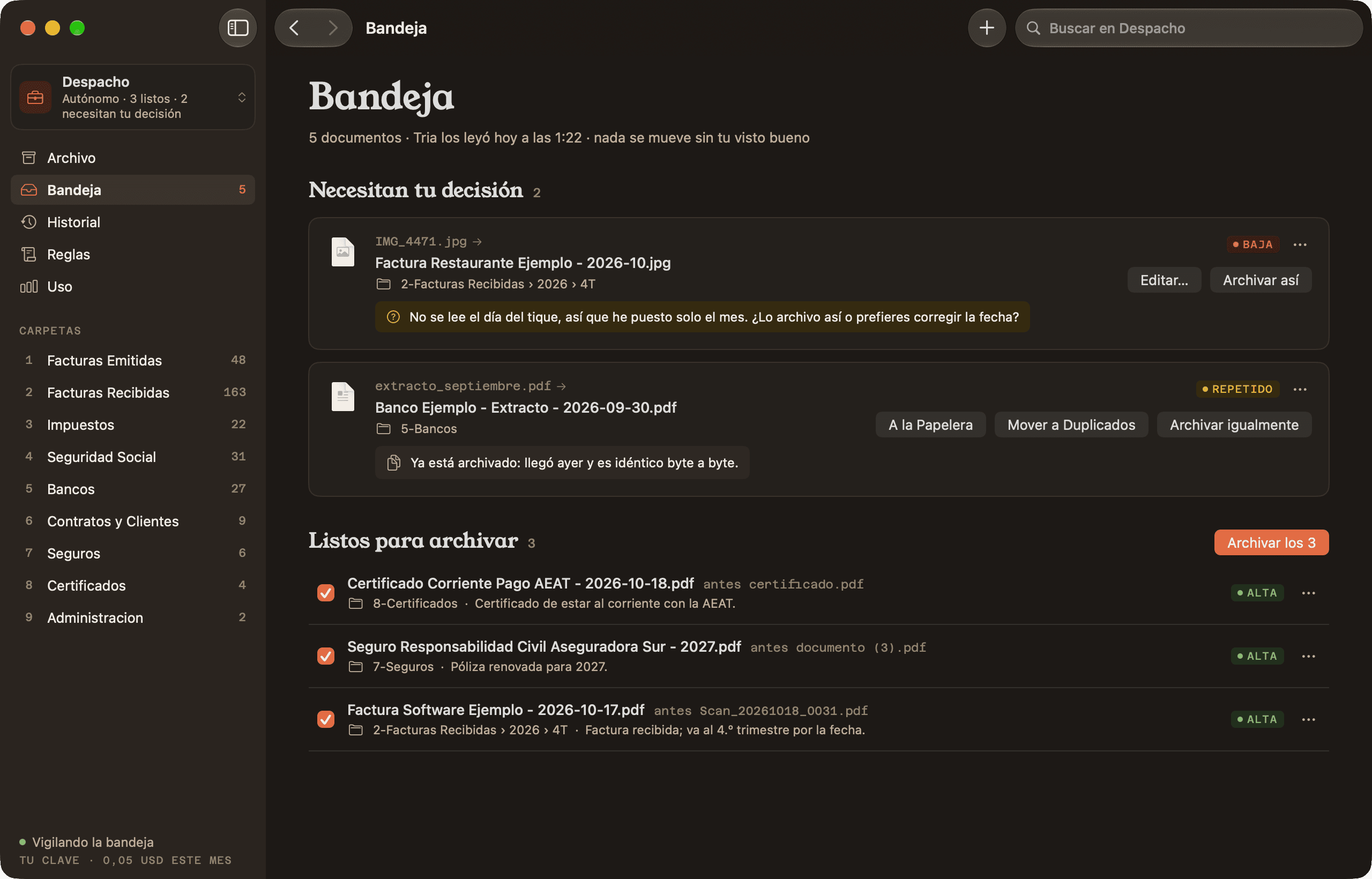
Names and folders
Names that make sense, each in its own folder.
Tria opens each document and reads it, like you would: it doesn’t trust the file name. It names and files it by your rules, by year and quarter if you ask.
- Arrives
- Scan_20261011_0012.pdf
- Becomes
- Invoice Bay Stationery - 2026-10-11.pdf
- In
- 2-Invoices Received › 2026 › Q4
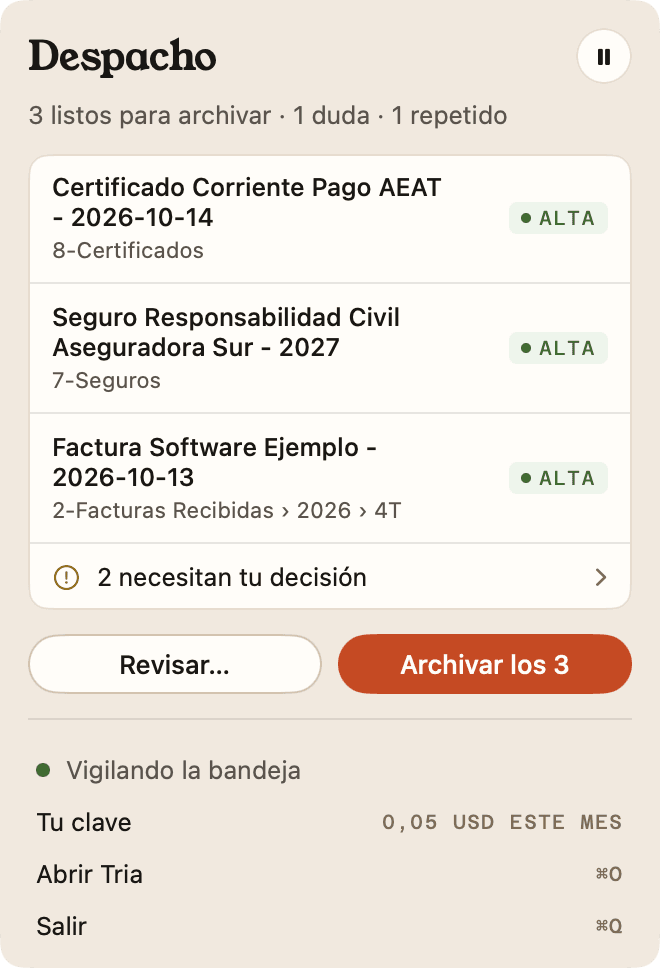
Menu bar
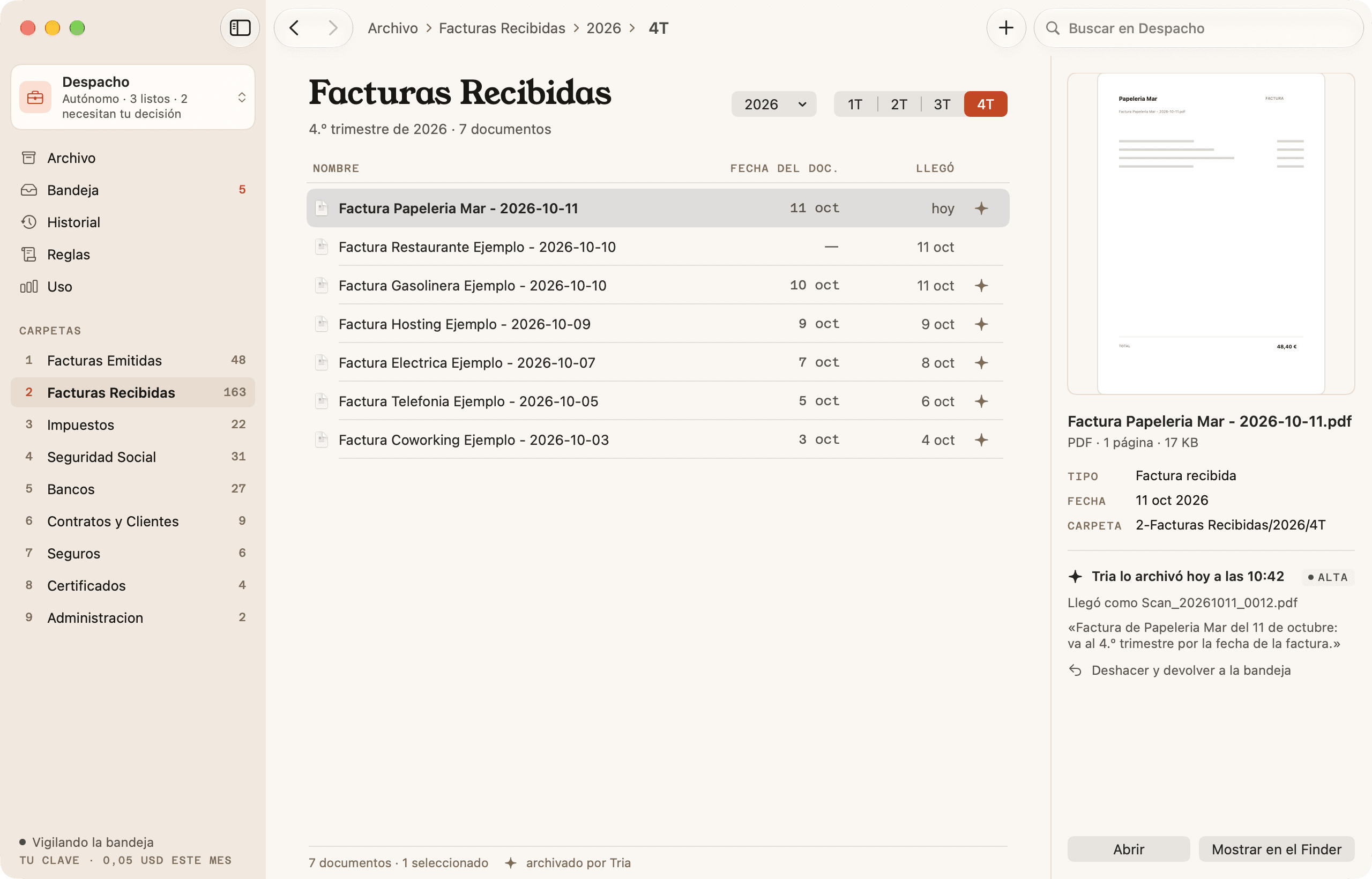
Tria watches your inbox, even with the window closed.
It lives in the menu bar: it reads what lands in the inbox and tells you how many documents are ready. File what it’s sure about in one click, without opening the app, and the rest waits for you.
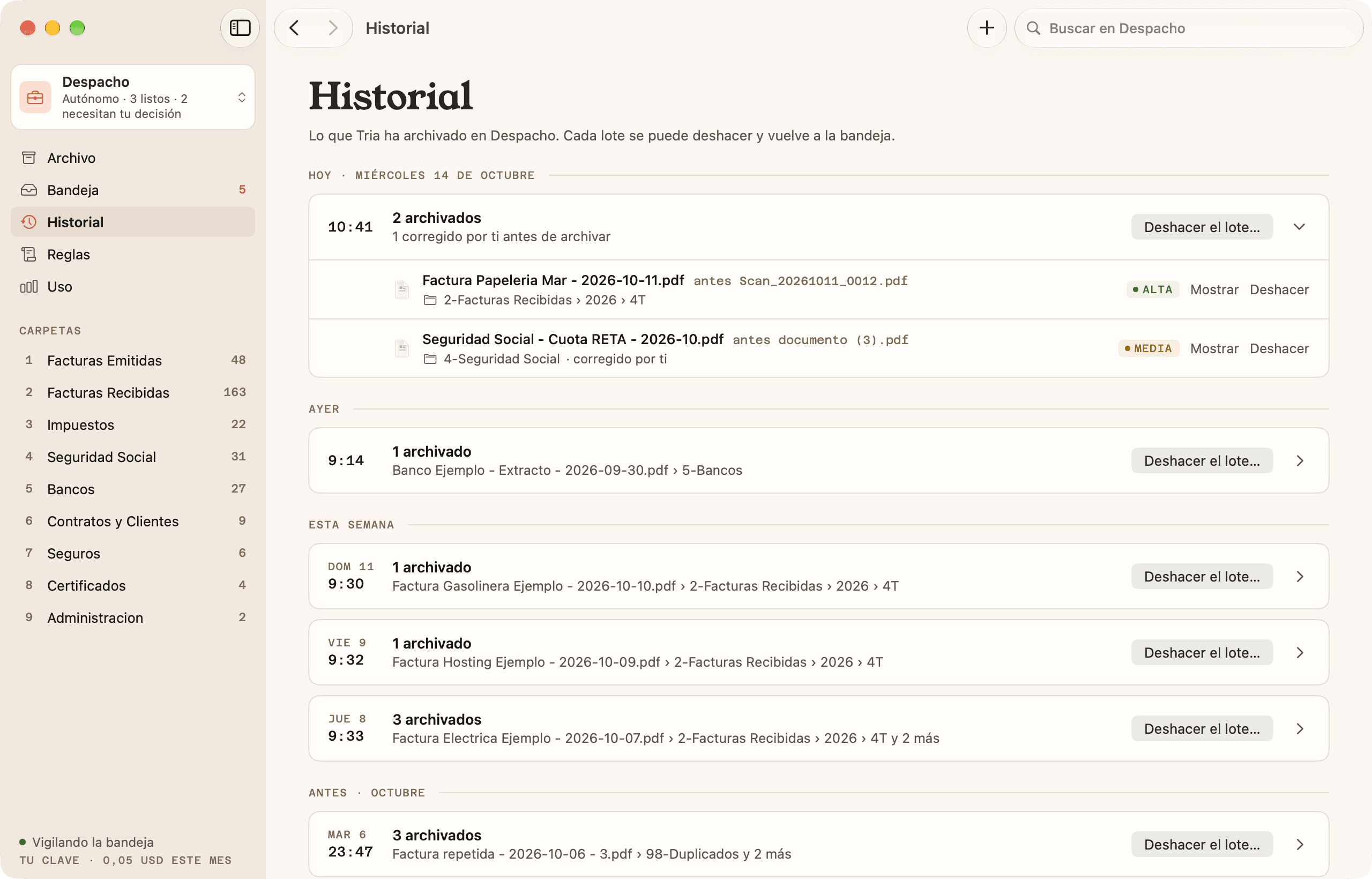
History
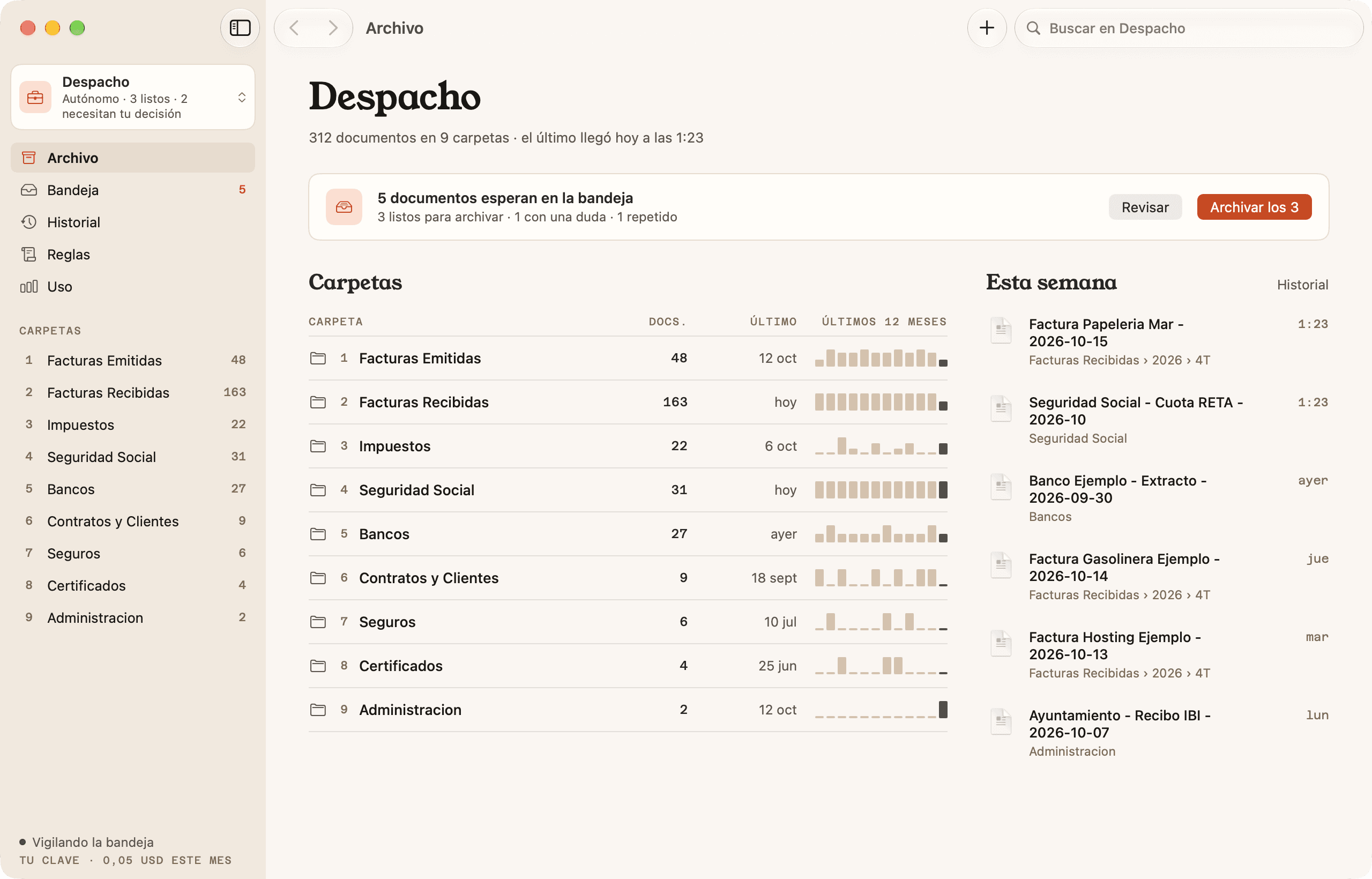
Everything is written down.
And everything can be undone.
Every batch stays in the history: where each document came from, where it went and why. One click and it’s back in the inbox with its original name. Tria never deletes or overwrites.
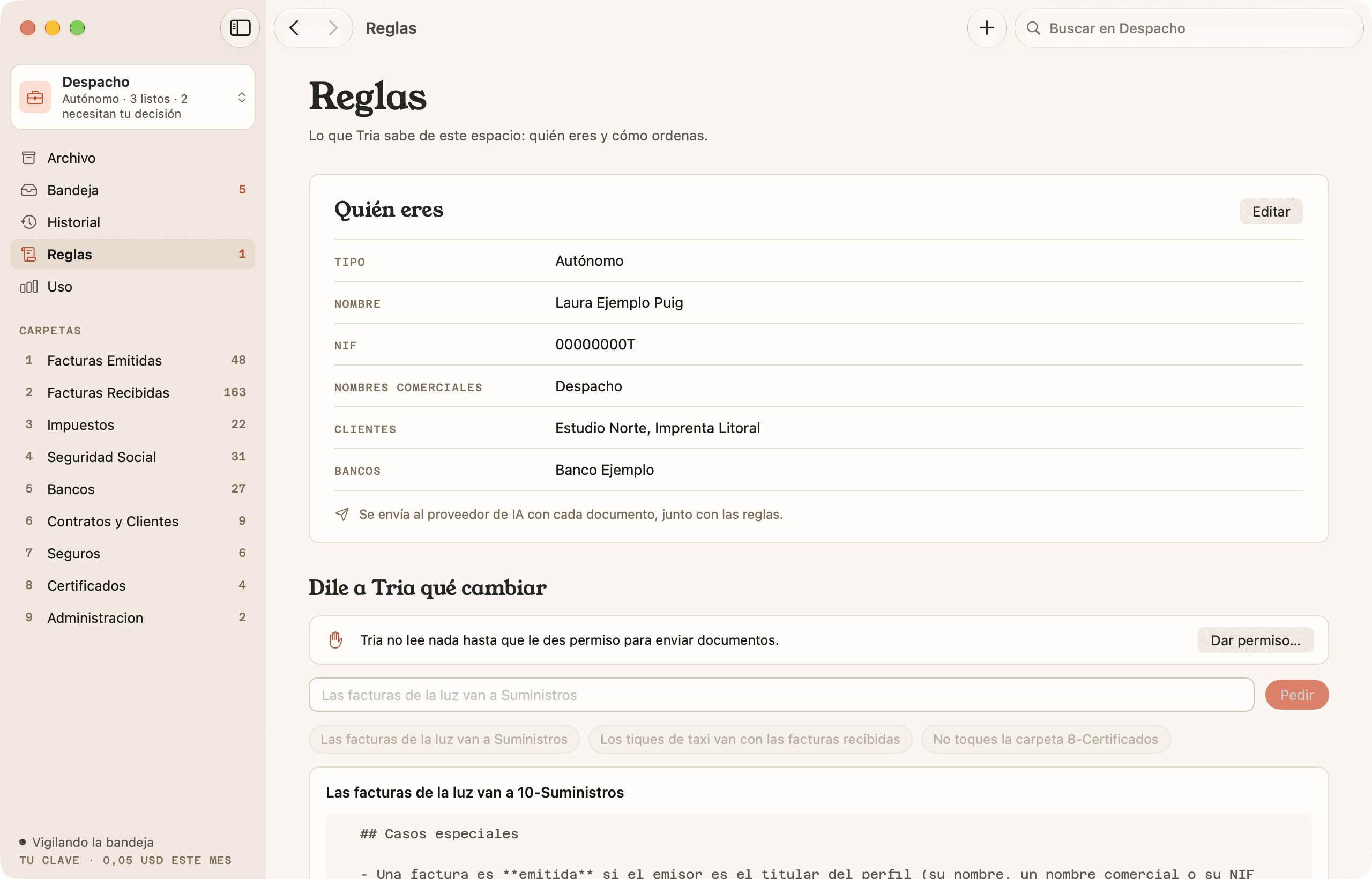
Your rules
It knows who you are and how you file.
Start with a template for freelancers, companies or your home. To change something, tell it in your own words: Tria shows you the change before saving it.
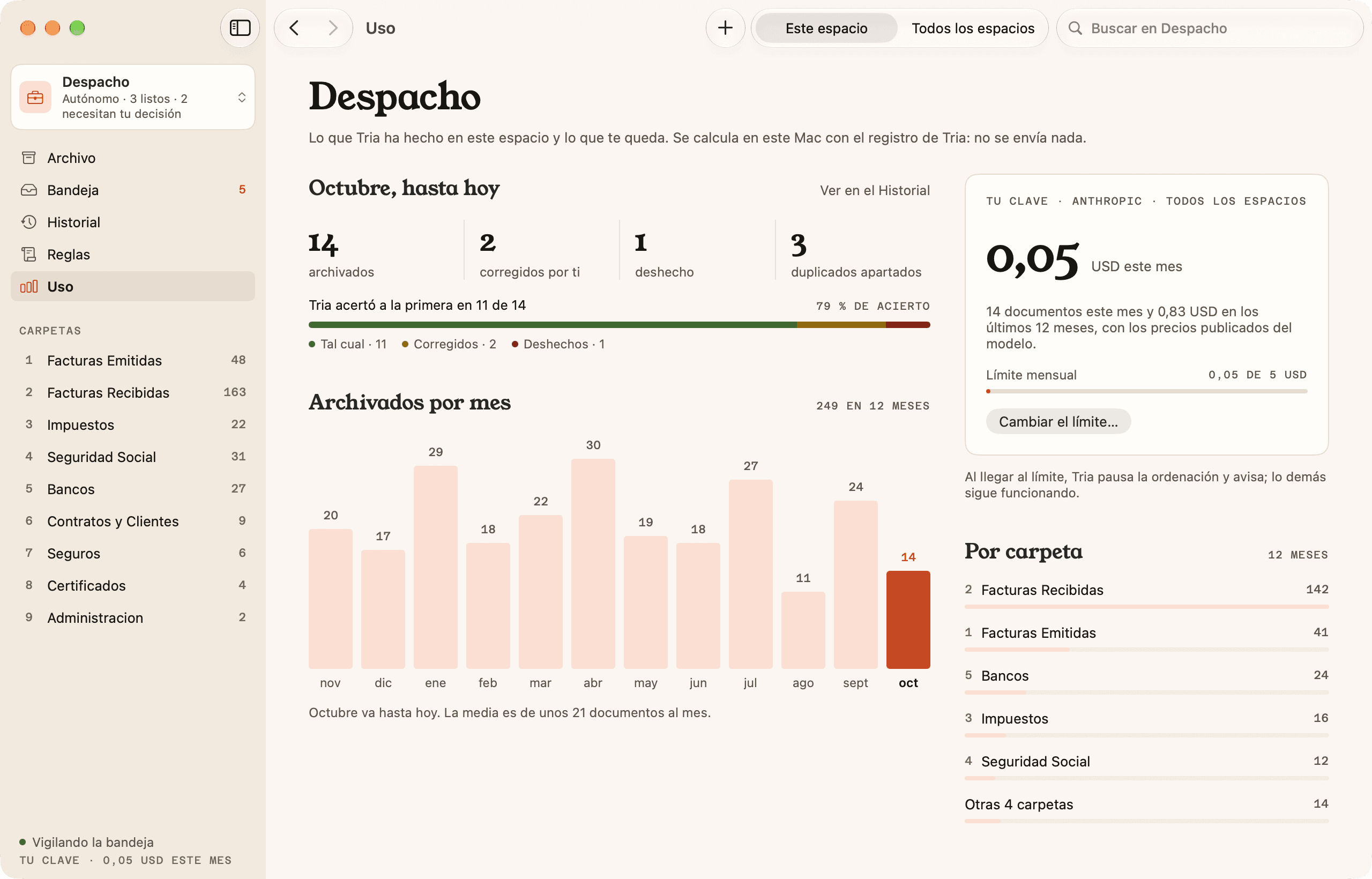
Usage and spending
You know what it does and what it costs.
How many it got right the first time, how many you corrected and what you spend, with a monthly limit if you want one. It’s all worked out on your Mac.
Principles
Five rules Tria never breaks.
Tria grew out of the tool Start.cat uses to sort its own paperwork. These are the rules we run it by.
- 01
It always reads the content.
It doesn’t trust the file name. If it can’t read a document, it doesn’t guess: it leaves it in the inbox with a note.
- 02
It never deletes or overwrites.
It only moves and renames. If the name is taken, it adds “(2)”. Nothing goes to the Trash unless you send it there.
- 03
When in doubt, it asks.
If it’s torn between two folders or can’t find the date, it doesn’t force an answer: it leaves you the proposal and the reason.
- 04
Everything can be undone.
Every move is logged in your folder. Undo a whole batch or a single document.
- 05
Your documents aren’t stored.
With your key, they go straight to your provider. With Tria AI, they pass through our server and aren’t stored.
Privacy
What leaves your Mac is up to you.
There’s no account to create. With your own key, nothing reaches us; with Tria AI, only what’s needed to keep your balance. Before reading anything, Tria shows you what will leave your Mac and asks for permission.
Stays on your Mac
- The full documents.
- The text extraction, scans included.
- The log of what’s been moved.
- Your key, in the macOS Keychain.
Leaves so the AI can read it
- Your rules (TRIA.md) and your profile.
- The list of your folders, with a few example names.
- An excerpt: the first 3 pages, about 12,000 characters at most.
- Its original name and dates.
- An image of the first 2 pages, only if there’s no readable text.
Where it goes
- With your key: from your Mac to Anthropic or OpenAI, and nobody else.
- With Tria AI: through our server in the EU, on its way to Claude in Europe. The content isn’t stored.
- We keep your balance and a usage log with no content, tied to your Apple purchase.
See for yourself: “See What’s Sent” in the app shows it without sending it. In the terminal, tria sort --show-prompt prints it before sending it.
Pricing
One payment. AI only if you want it.
No subscription and no account. You buy it on the Mac App Store and it’s tied to your Apple Account.
To get started
Free20 documents
Download Tria and sort your first documents to see how it works.
- With Tria AI or your own key
- Every feature in the app
The app, for good
€9.99one-time payment
Unlocks Tria for good, with AI documents included to get you going.
- 200 documents with Tria AI
- Or your Anthropic or OpenAI key, no limit
- No subscription, no account
When you need them
€8.99500 documents
Once the app is unlocked, Tria AI packs that never expire. Or stick with your key and pay your provider.
- Never expire
- With your key, about $0.01 per document
The CLI is free and open source, and always uses your own key.
For power users
Live in the terminal? So does Tria.
The engine (TriaKit) and the tria CLI are open source, under the Apache-2.0 license. The app runs on the same engine and everything lives in your folder: what you sort in the terminal looks the same in the app, and vice versa.
brew install startcat/tap/triatria config --provider anthropic --set-key# to the Keychaincd ~/Documents/Businesstria init --template autonomo --lang es# or --learntria sort# it proposes, you review, you approve✓ 9 documents read in 12 stria undo --last# if something’s not rightDocumentation
- Your API keyAnthropic or OpenAI: how to create one, where it’s stored and how to set a spending limit.
- The tria CLIEvery command, the --json output and the exit codes for your scripts.
- The rules: TRIA.mdHow to write folders, names and special cases, with examples.
- Shortcuts and Siri“How’s Tria doing?”, the inbox and spending, from Shortcuts, Siri and Spotlight.
FAQ
Before
you start.
Question not here? The documentation goes into detail, and if that doesn’t help, write to us at hola@lyn.cat.
When is Tria coming out?
The app is coming soon to the Mac App Store. The CLI is already out: it installs with Homebrew and works with your own key. If you’d like to know on day one of the app, write to hola@lyn.cat and we’ll let you know.
What do I need to use Tria?
A Mac with macOS 26. That’s it: the app comes with Tria AI, so you don’t need to create an account or get a key. If you already have an Anthropic or OpenAI API key, you can use that too.
What is Tria AI?
It’s how you use Tria without a key for any AI. The app sends just what’s needed from each document to our server in the EU, which passes it on to Claude in Europe and doesn’t store the content. Each document read takes one off your balance: 200 come with the app and, if you need more, there are packs of 500.
How much does it cost to sort a document?
With Tria AI, it’s included: 200 documents with the one-time payment, and packs of 500 for €8.99 that never expire. With your key, you pay your provider: with the default model, about $0.01 per document. The app keeps count and can pause itself when it hits the monthly limit you choose.
What exactly is sent, and where?
Your rules (TRIA.md) and your profile, the list of your folders with a few example names, the document’s original name and dates, and an excerpt: the first 3 pages, about 12,000 characters at most. An image of the pages is only sent if there’s no readable text. With your key, it goes to Anthropic or OpenAI; with Tria AI, to Claude in Europe through our server. You can see it before it leaves with “See What’s Sent”.
What if it gets it wrong?
Tria doesn’t move anything without your OK. You see the new name, the folder, the confidence and the reason, and you can change whatever you like before approving. If you correct a proposal, Tria suggests a rule so it doesn’t happen again. If the document has already been moved, you undo it from the History.
Can it sort without asking me?
Yes, if you want it to. Automatic mode is turned on per space and starts off. Tria files only what it’s very sure about, and the rest waits for you in the inbox. Automatic filing can be undone too, and it never uses the Trash.
Does the app have to be open?
The window doesn’t have to be open. Tria lives in the menu bar: it reads what lands in the inbox, tells you how many documents are ready, and you can file what it’s sure about right from there. If you like, it opens by itself when you log in.
What languages does it speak?
Catalan, Spanish and English. The app follows your Mac’s language. The rule templates are in Catalan and Spanish, and Tria reads documents in all three languages, scans included.

A Start.cat product
Tria was born to sort our own paperwork.
Start.cat is a Barcelona agency that has been building apps, digital products and AI automation since 2012. We turned our in-house tool into a product to show how we work: the AI proposes, the code checks and you decide. Got paperwork, processes or data that could sort themselves out? Tell us about it.